The best Microsoft Project alternatives for Mac and iPad
There is no Microsoft Project for Mac. These are the realistic alternatives in 2026, what each does with your .mpp files, and who each one suits. Yes, we make one of them; we’ve tried to be fair.
Updated 17 October 2026
Quick answer
If you exchange .mpp files with Microsoft Project users, pick an app that saves .mpp: MPP Studio or Project Plan 365. If you need every Project feature, run Project in Parallels. If you plan alone, OmniPlan and Merlin Project are excellent full project managers. ProjectLibre is the free option.
First, one question: do you need to keep the .mpp?
If you plan on your own and never exchange files, any good project manager will do. If you receive programmes from clients or contractors, or send them back, what matters most is whether the app opens and saves the .mpp file itself, or converts it into its own format.
At a glance
| APP | MAC / IPAD | .MPP FILES | PRICE MODEL | BEST FOR |
|---|---|---|---|---|
| MPP Studio | Both, one purchase | Opens, edits and saves .mpp | App Store (at launch) | Working on .mpp files you exchange with Project users |
| Project Plan 365 | Both, plus Windows, iPhone, web | Opens, edits and saves .mpp | Subscription (about $130/yr Standard on the Mac App Store) | Teams that need the same app on every platform |
| OmniPlan 4 | Both, plus iPhone | Imports .mpp; exports .mpp and XML (Pro) | One-time ($200 Standard, $400 Pro) or subscription | Mac-first planners who want a polished full project manager |
| Merlin Project | Both, plus iPhone | Imports .mpp; exports Project XML | Subscription, priced per platform | Agencies and teams wanting Gantt, Kanban and resources in one |
| ProjectLibre | Mac (desktop), no iPad | Opens .mpp; saves its own format or XML | Free, open source | Learning and occasional use on a budget |
| Parallels + Microsoft Project | Mac only | Full Project | Parallels + Windows + Project licences | People who need every Project feature, e.g. Project Server |
How we compared
We looked at what each app does with a real Microsoft Project file: can it open it, can it save it back as an .mpp, and what happens to links, calendars, resources and baselines on the way. Features and prices come from each vendor’s website, manual and App Store listing in October 2026. Where a vendor’s own documentation is the only source, we say so.
MPP Studio
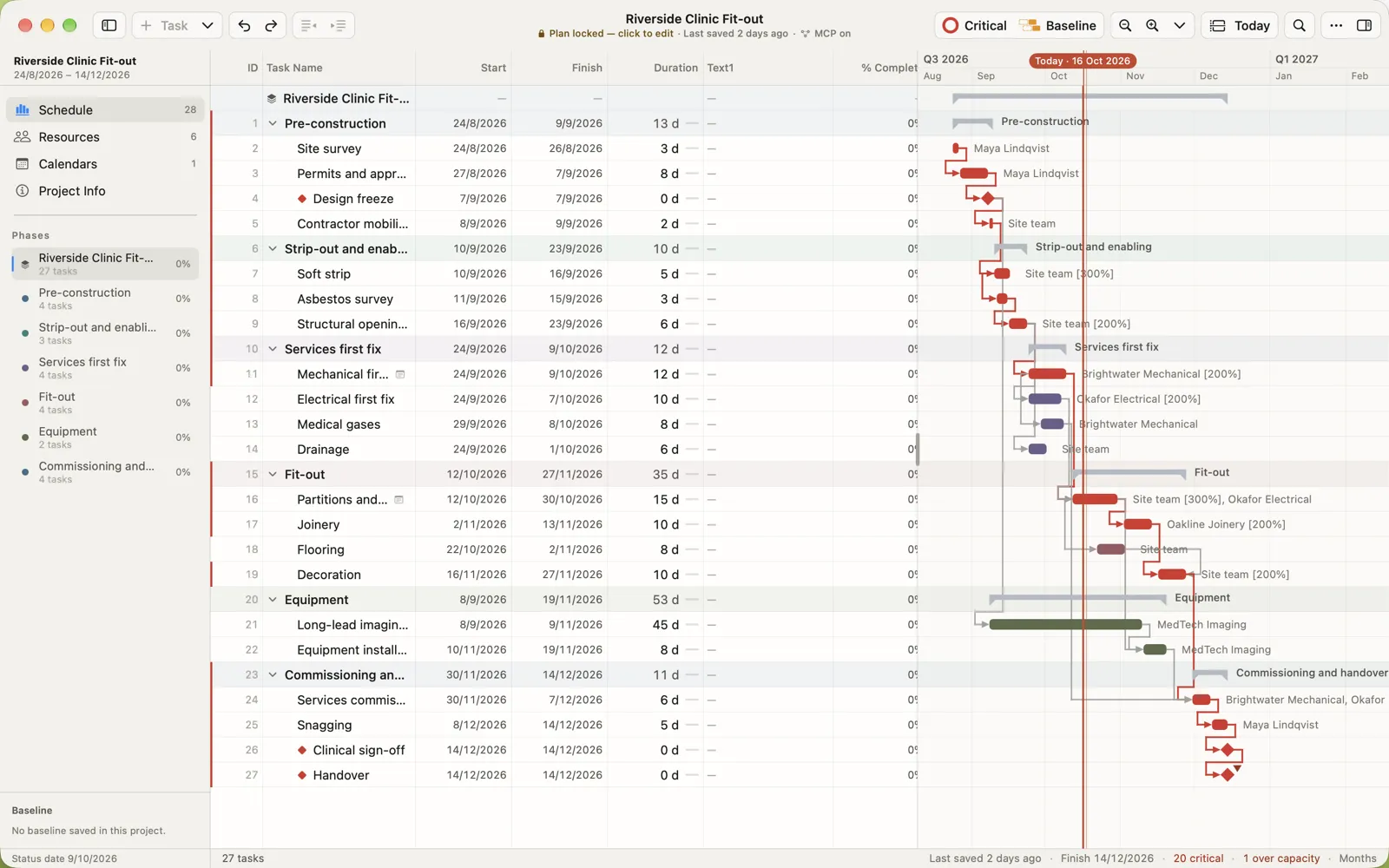
A native Mac and iPad app built around the .mpp file. It reads and writes Microsoft Project’s own format (Project 2010 through Microsoft 365), so the file you save opens in Project on Windows as the sender expects. The workflow is scheduling and tracking: edit in a Project-style grid, lock the plan as a baseline, record actuals daily and see the forecast finish.
Good at
- Saves .mpp, nothing converted
- Native on Mac and iPad, one purchase
- Lock Plan and daily progress tracking
- Offline, no account, files never uploaded
Less good at
- No portfolios, timesheets or team server: file-based by design
- No iPhone or Windows version
- New: launching on the App Store soon
Project Plan 365
The longest-standing .mpp editor outside Microsoft, available on nearly every platform. It opens and saves .mpp and mirrors Project’s views and dialogs closely.
Good at
- Saves .mpp
- Windows, Mac, iPad, iPhone, Android and web
- Familiar to Microsoft Project users
Less good at
- Subscription only, priced per edition
- App Store reviews mention price and reliability; try it with your own files
- Same interface everywhere rather than a native Mac or iPad design
OmniPlan 4
A beautifully made Mac, iPad and iPhone project manager from The Omni Group, with critical path, resource levelling and Monte Carlo simulation.
Good at
- Polished native Apple design
- Resource levelling and Monte Carlo simulation
- One-time purchase available
Less good at
- Microsoft Project import and export need the Pro edition
- Imported plans become OmniPlan documents
- Manual lists .mpp support up to Project 2019
Merlin Project
A full project manager for Mac and iPad with Gantt, Kanban, mind maps, resources and budgets.
Good at
- Broad: Gantt, Kanban, mind maps, risks, budgets
- Native Apple apps
- Free 30-day trial
Less good at
- Exports Project XML, not .mpp
- Vendor lists .mpp import from Project 2003 to 2016
- Mac and iPad are separate subscriptions
ProjectLibre
The free, open-source desktop app that looks most like classic Microsoft Project. It runs on Mac, Windows and Linux.
Good at
- Free and open source
- Familiar to classic Project users
- Mac, Windows and Linux
Less good at
- Saves its own format or Project XML, not .mpp
- No iPad app
- Doesn’t look or behave like a Mac app
Parallels and Microsoft Project
Running Windows in a virtual machine gives you the real Microsoft Project, so nothing is converted.
Good at
- Every Project feature, including Project Server and macros
- Nothing to convert
Less good at
- Three licences: Parallels, Windows, Project
- Heavy on memory and battery
- Mac only: nothing for the iPad
Our recommendation
- You exchange .mpp files with Project users: MPP Studio or Project Plan 365.
- You need every Project feature or Project Server: Parallels + Microsoft Project.
- You plan on your own and want a full Mac project manager: OmniPlan or Merlin Project.
- You need something free for occasional use: ProjectLibre.
Questions people ask
What is the best Microsoft Project alternative for Mac?
It depends on whether you exchange .mpp files. If you do, choose an app that saves .mpp, such as MPP Studio or Project Plan 365. For planning on your own, OmniPlan and Merlin Project are strong full project managers.
Is there a free Microsoft Project alternative for Mac?
ProjectLibre is free and open source. It opens .mpp files but saves its own format or Microsoft Project XML, not .mpp.
Can I run Microsoft Project on a Mac?
Only inside Windows, for example in Parallels Desktop, with separate Windows and Project licences.
Try it with your own file
Open a programme you already have and see it exactly as Project saved it.
Related
Microsoft and Microsoft Project are trademarks of Microsoft Corporation. MPP Studio is not affiliated with Microsoft. Other product names are trademarks of their owners. Competitor details are taken from their own websites and App Store listings in October 2026; check with the vendor for current prices.